
HTTP Topic
HTTP Fundamentals and Protocol Overview
What You'll Learn:
-
Understanding HTTP as an application-layer protocol
-
Client-Server architecture and stateless nature
-
HTTP message structure and components
Detailed Explanation:
HTTP Protocol Basics
HTTP (Hypertext Transfer Protocol) is a stateless, application-layer protocol for distributed, collaborative, hypermedia information systems.
Key Characteristics:
-
Client-Server Model: Clear separation between client (makes requests) and server (processes requests)
-
Stateless: Each request is independent, no session information is retained
-
TCP-based: Uses reliable TCP connections (typically port 80 for HTTP, 443 for HTTPS)
-
Media Independent: Can transmit any type of data as long as both client and server understand how to handle it
HTTP Message Structure
Request Message Format:
HTTP-method SP request-target SP HTTP-version CRLF
Header-field: field-value CRLF
...
CRLF
Message-body (optional)
Response Message Format:
HTTP-version SP status-code SP reason-phrase CRLF
Header-field: field-value CRLF
...
CRLF
Message-body (optional)
Example HTTP Exchange
Client Request:
GET /api/users/123 HTTP/1.1
Host: api.example.com
User-Agent: Mozilla/5.0
Accept: application/json
Authorization: Bearer token123
Server Response:
HTTP/1.1 200 OK
Content-Type: application/json
Content-Length: 45
Date: Mon, 23 Jan 2023 10:30:45 GMT

{"id": 123, "name": "John Doe", "email": "[email protected]"}
HTTP Versions Evolution
| Version | Year | Key Features |
|---|---|---|
| HTTP/0.9 | 1991 | Simple GET-only protocol |
| HTTP/1.0 | 1996 | Headers, status codes, methods |
| HTTP/1.1 | 1997 | Persistent connections, chunked encoding |
| HTTP/2 | 2015 | Binary protocol, multiplexing, header compression |
| HTTP/3 | 2022 | QUIC transport, improved performance |
Practical Demonstration
Using Telnet for Raw HTTP:
# Connect to web server
telnet example.com 80

# Send raw HTTP request
GET / HTTP/1.1
Host: example.com

# Response will be displayed
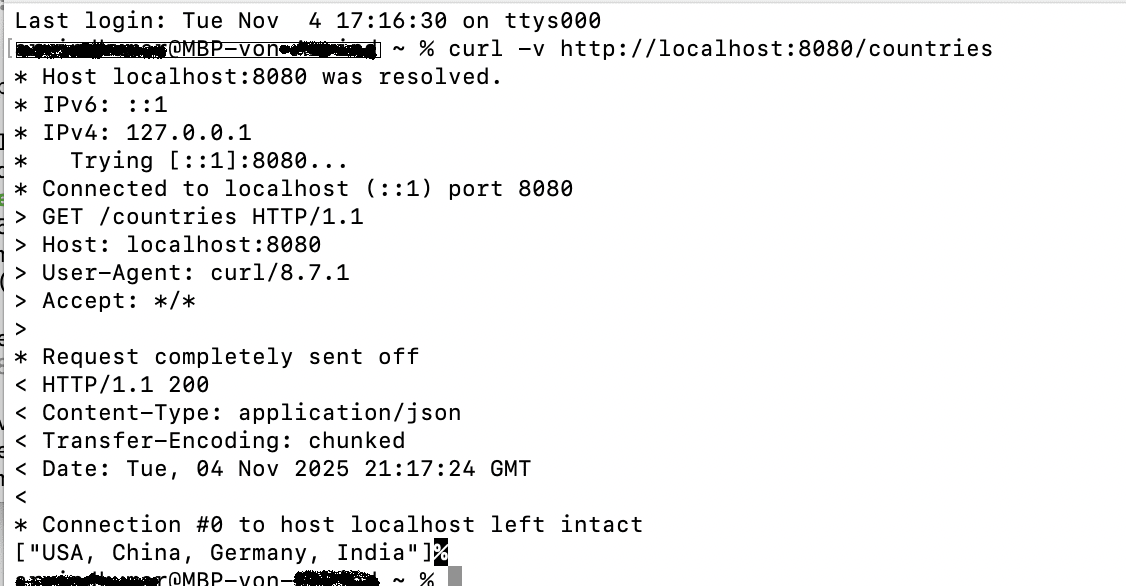
Using curl for HTTP Testing:
# Basic GET request
curl -v https://api.example.com/users/123

# Custom headers
curl -H "Authorization: Bearer token123" \
     -H "Content-Type: application/json" \
     https://api.example.com/users

# POST request with JSON body
curl -X POST \
     -H "Content-Type: application/json" \
     -d '{"name":"John","email":"[email protected]"}' \
     https://api.example.com/users


Comments (1)
Great tutorial