
Mobile Development Topic
Mobile Development Overview
What is Mobile Development?
Mobile development is the process of creating software applications that run on mobile devices like smartphones and tablets. It involves designing, building, testing, and maintaining apps for various mobile platforms.
1. Development Approaches
There are three main approaches to mobile development:
Native Development
Creating apps specifically for one mobile operating system using platform-specific programming languages and tools.
Pros:
-
Best performance and responsiveness
-
Full access to device features (camera, GPS, sensors)
-
Better user experience (follows platform guidelines)
-
Easier access to latest platform features
Cons:
-
Separate codebases for each platform
-
Higher development cost and time
-
Requires platform-specific expertise
Cross-Platform Development
Writing code once and deploying to multiple platforms using frameworks that compile to native code or run in a shared runtime.
Pros:
-
Single codebase for multiple platforms
-
Faster development cycle
-
Lower development costs
-
Shared business logic
Cons:
-
Performance may not match native apps
-
Limited access to latest platform features
-
Larger app size
-
Potential UI inconsistencies
Hybrid/Web Development
Building apps using web technologies (HTML, CSS, JavaScript) that run in a embedded browser (WebView) within a native container.
Pros:
-
Web developers can build mobile apps
-
Maximum code reuse
-
Easy to update content
-
Low development cost
Cons:
-
Poor performance for complex apps
-
Limited device feature access
-
User experience feels less native
-
App store restrictions
2. Major Platforms & Ecosystems
iOS Development
Primary Language: Swift (Objective-C for legacy)
IDE: Xcode
Distribution: Apple App Store
Key Technologies:
-
SwiftUI: Modern declarative UI framework
-
UIKit: Traditional imperative UI framework
-
Core Data: Local data persistence
-
ARKit: Augmented reality
-
Core ML: Machine learning
Example Swift Code:
swift
import SwiftUI

struct ContentView: View {
    @State private var count = 0

    var body: some View {
        VStack {
            Text("Count: \(count)")
                .font(.title)

            Button("Increment") {
                count += 1
            }
            .padding()
            .background(Color.blue)
            .foregroundColor(.white)
            .cornerRadius(10)
        }
    }
}
Android Development
Primary Language: Kotlin (Java for legacy)
IDE: Android Studio
Distribution: Google Play Store
Key Technologies:
-
Jetpack Compose: Modern declarative UI
-
XML Layouts: Traditional UI definition
-
Room: Database abstraction
-
WorkManager: Background tasks
-
ML Kit: Machine learning
Example Kotlin Code:
kotlin
class MainActivity : ComponentActivity() {
    override fun onCreate(savedInstanceState: Bundle?) {
        super.onCreate(savedInstanceState)
        setContent {
            MyAppTheme {
                var count by remember { mutableStateOf(0) }

                Column(
                    modifier = Modifier
                        .fillMaxSize()
                        .padding(16.dp),
                    horizontalAlignment = Alignment.CenterHorizontally,
                    verticalArrangement = Arrangement.Center
                ) {
                    Text(
                        text = "Count: $count",
                        style = MaterialTheme.typography.h4
                    )

                    Spacer(modifier = Modifier.height(16.dp))

                    Button(onClick = { count++ }) {
                        Text("Increment")
                    }
                }
            }
        }
    }
}
3. Major Cross-Platform Frameworks
React Native (Facebook)
Uses JavaScript/TypeScript and React principles to build native apps.
Architecture:
-
JavaScript thread handles business logic
-
Native thread handles UI rendering
-
Bridge facilitates communication between threads
Example:
javascript
import React, { useState } from 'react';
import { View, Text, Button, StyleSheet } from 'react-native';

const App = () => {
  const [count, setCount] = useState(0);

  return (
    <View style={styles.container}>
      <Text style={styles.text}>Count: {count}</Text>
      <Button
        title="Increment"
        onPress={() => setCount(count + 1)}
      />
    </View>
  );
};

const styles = StyleSheet.create({
  container: {
    flex: 1,
    justifyContent: 'center',
    alignItems: 'center',
  },
  text: {
    fontSize: 24,
  },
});

export default App;
Flutter (Google)
Uses Dart language and compiles to native code with its own rendering engine.
Key Features:
-
Everything is a widget
-
Single codebase for iOS, Android, web, and desktop
-
Hot reload for rapid development
-
High performance
Example Dart Code:
dart
import 'package:flutter/material.dart';

void main() {
  runApp(MyApp());
}

class MyApp extends StatelessWidget {
  @override
  Widget build(BuildContext context) {
    return MaterialApp(
      home: CounterScreen(),
    );
  }
}

class CounterScreen extends StatefulWidget {
  @override
  _CounterScreenState createState() => _CounterScreenState();
}

class _CounterScreenState extends State<CounterScreen> {
  int _counter = 0;

  void _incrementCounter() {
    setState(() {
      _counter++;
    });
  }

  @override
  Widget build(BuildContext context) {
    return Scaffold(
      appBar: AppBar(title: Text('Flutter Counter')),
      body: Center(
        child: Column(
          mainAxisAlignment: MainAxisAlignment.center,
          children: <Widget>[
            Text('Count:', style: Theme.of(context).textTheme.headline4),
            Text('$_counter', style: Theme.of(context).textTheme.headline2),
          ],
        ),
      ),
      floatingActionButton: FloatingActionButton(
        onPressed: _incrementCounter,
        tooltip: 'Increment',
        child: Icon(Icons.add),
      ),
    );
  }
}
Other Notable Frameworks:
-
Xamarin/.NET MAUI: C# framework from Microsoft
-
Ionic: Hybrid framework using web technologies
-
NativeScript: JavaScript framework with direct native API access
4. Mobile App Architecture Patterns
MVVM (Model-View-ViewModel)
Popular for modern mobile development, especially with data binding.
Components:
-
Model: Data and business logic
-
View: UI components and presentation
-
ViewModel: Mediator between Model and View
Example (Android with ViewModel):
kotlin
class UserViewModel : ViewModel() {
    private val _users = MutableLiveData<List<User>>()
    val users: LiveData<List<User>> = _users

    fun loadUsers() {
        // Business logic here
        viewModelScope.launch {
            val userList = repository.getUsers()
            _users.value = userList
        }
    }
}
MVC (Model-View-Controller)
Traditional pattern where Controller handles user input and updates Model/View.
MVP (Model-View-Presenter)
Similar to MVC but with clearer separation, where Presenter contains UI logic.
5. Key Mobile Development Concepts
State Management
Local State: State within a single widget/component
Global State: Application-wide state shared across components
Common Solutions:
-
React Native: Redux, Context API, MobX
-
Flutter: Provider, Bloc, Riverpod
-
Native: ViewModel (Android), ObservableObject (iOS)
Navigation
Handling screen transitions and deep linking.
Examples:
javascript
// React Native Navigation
navigation.navigate('Profile', { userId: 123 });

// Flutter Navigation
Navigator.push(context, MaterialPageRoute(builder: (context) => ProfileScreen()));
Data Storage
Options:
-
Local Storage: SQLite, Realm, SharedPreferences
-
File System: Documents, Caches
-
Key-Value Stores: AsyncStorage, NSUserDefaults
-
Cloud Storage: Firebase, AWS Amplify
Networking
Common Libraries:
-
React Native: Axios, Fetch API
-
Flutter: http package, Dio
-
Native: URLSession (iOS), Retrofit (Android)
Example API Call:
dart
// Flutter example
Future<User> fetchUser() async {
  final response = await http.get(Uri.parse('https://api.example.com/user/1'));

  if (response.statusCode == 200) {
    return User.fromJson(jsonDecode(response.body));
  } else {
    throw Exception('Failed to load user');
  }
}
6. Mobile-Specific Considerations
Performance Optimization
-
Memory Management: Avoid memory leaks, use efficient data structures
-
Battery Efficiency: Minimize background activity, optimize network calls
-
Render Performance: Reduce UI re-renders, use efficient layouts
Security
-
Data Encryption: Secure sensitive data at rest and in transit
-
Authentication: Implement secure login flows (OAuth, biometrics)
-
Code Obfuscation: Protect intellectual property
-
API Security: Use HTTPS, certificate pinning
User Experience (UX)
-
Touch Interactions: Gestures, swipe actions, haptic feedback
-
Offline Capability: Handle network connectivity issues gracefully
-
Accessibility: Support screen readers, dynamic text sizing
-
Internationalization: Support multiple languages and regions
7. Development Lifecycle
1. Planning & Design
-
User research and requirements gathering
-
UI/UX design and prototyping
-
Architecture planning
2. Development
-
Setting up development environment
-
Implementing features following agile methodology
-
Continuous integration and testing
3. Testing
-
Unit Testing: Individual component testing
-
Integration Testing: Component interaction testing
-
UI Testing: Automated UI interaction testing
-
Device Testing: Testing on various devices and OS versions
4. Deployment
-
App store submission (Apple App Store, Google Play)
-
Beta testing programs (TestFlight, Google Play Console)
-
Monitoring and analytics setup
5. Maintenance
-
Bug fixes and performance improvements
-
Feature updates and enhancements
-
OS compatibility updates
8. Modern Trends & Technologies
Emerging Technologies:
-
5G: Enhanced network capabilities
-
Foldable Devices: Adaptive UI for different form factors
-
AR/VR: Immersive experiences
-
AI/ML: On-device intelligence
-
IoT Integration: Connected device ecosystems
Development Trends:
-
Server-Driven UI: Dynamic UI updates without app store releases
-
Micro Frontends: Modular app architecture
-
Low-Code/No-Code: Visual development platforms
-
PWA (Progressive Web Apps): Web apps with native-like capabilities
9. Getting Started Guide
For Beginners:
-
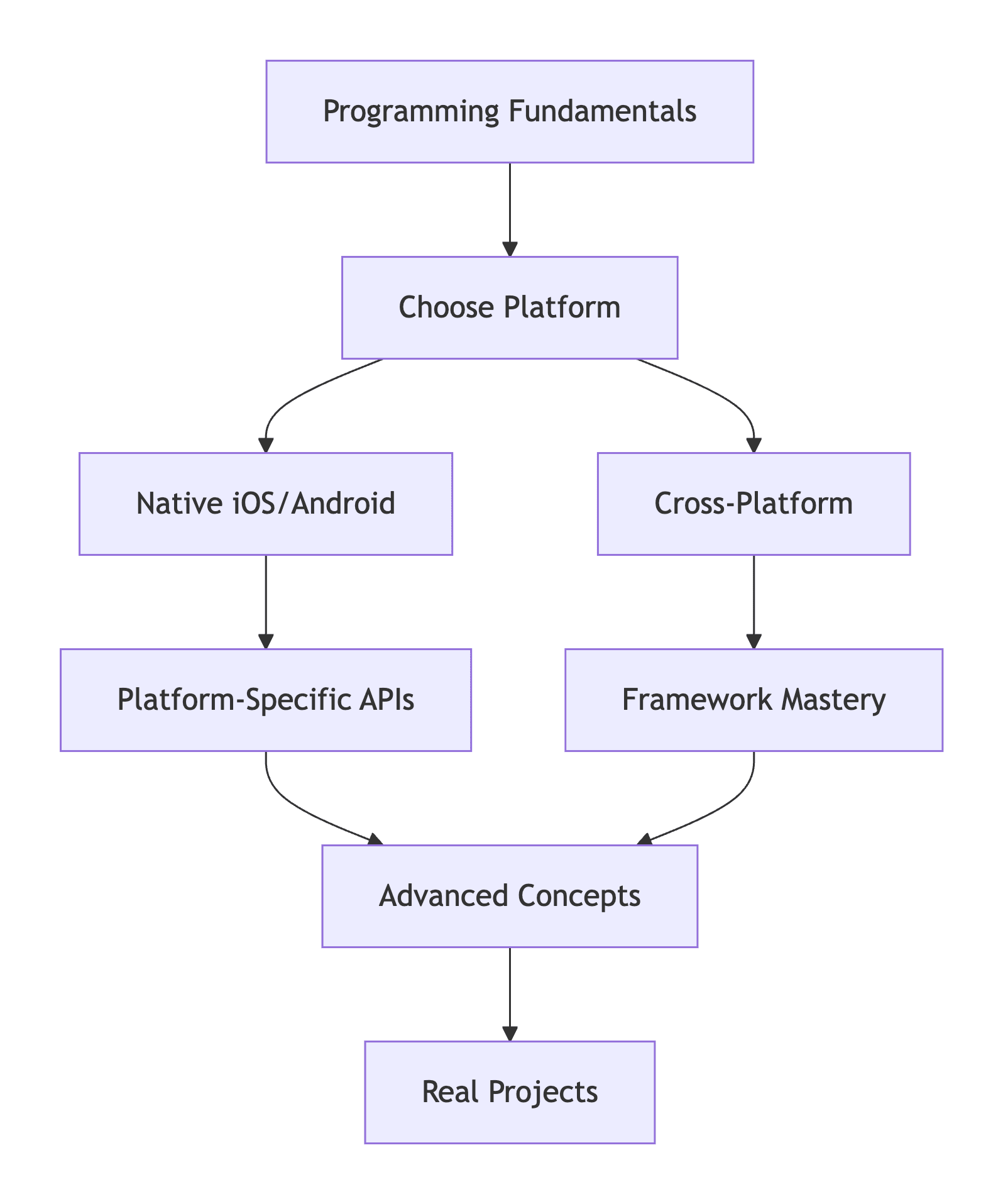
Choose your path: Native (Swift/Kotlin) or Cross-platform (Flutter/React Native)
-
Learn fundamentals: Programming basics, then platform-specific concepts
-
Build simple projects: Calculator, weather app, to-do list
-
Study existing code: Open-source projects, tutorials
-
Join communities: Stack Overflow, GitHub, platform-specific forums
Recommended Learning Path:
10. Career Opportunities
Roles:
-
iOS Developer
-
Android Developer
-
Mobile Architect
-
React Native/Flutter Developer
-
Mobile DevOps Engineer
Skills in Demand:
-
Platform-specific development (Swift/Kotlin)
-
Cross-platform framework expertise
-
UI/UX implementation
-
Performance optimization
-
Security best practices
Mobile development continues to evolve rapidly, offering exciting opportunities for developers to create applications that billions of people use daily. The key to success is choosing the right approach for your specific needs and staying current with the constantly changing landscape.


Comments (0)
No comments yet. Be the first to comment!