
Java Topic
What is Java?
Java is a high-level, class-based, object-oriented programming language that's known for its platform independence.
This means that code written in Java can run on almost any device with a Java Virtual Machine (JVM) installed, making it incredibly versatile
Key Characteristics of Java:
- Object-Oriented: It's based on the concept of objects, which encapsulate data and behavior.
- Platform Independence: The "Write Once, Run Anywhere" (WORA) principle allows Java code to be executed on different platforms.
- Robust: Java has strong memory management and exception handling mechanisms to prevent errors.
- Secure: Built-in security features protect against viruses and malicious code.
- High Performance: While not as fast as languages like C++, Java offers good performance through just-in-time compilation.
The Birth of Java
- 991: The journey began at Sun Microsystems with a small team led by James Gosling, Mike Sheridan, and Patrick Naughton. Initially, the project was named "Green" and aimed to develop a language for consumer electronics like set-top boxes and interactive television.
- Oak: The language was initially called "Oak," inspired by an oak tree outside Gosling's office.
- Java: The name was changed to "Java" in 1994, inspired by the coffee bean of the same name.
The Rise of Java
- 1995: Java was officially released as a core component of Sun's Java platform. Its platform independence, security, and object-oriented features quickly gained popularity.
- 1996: JDK 1.0 was released, marking a significant milestone.
- Late 1990s: Java became the language of choice for web development with the introduction of applets, small programs that could run within web browsers.
- Early 2000s: Java expanded its reach beyond web applications to enterprise software, embedded systems, and mobile applications.
- 2007: Sun released most of Java's technologies under the GPL-2.0-only license, promoting open-source development.
- 2009: Oracle acquired Sun Microsystems, becoming the steward of Java.
- 2011: Java 7 was released with significant performance improvements and language enhancements.
- 2014: Java 8 introduced lambda expressions and functional programming features.
- 2017: Java 9 marked a modularization of the platform.
Java Today
Java continues to be a dominant force in the programming world. Its versatility, reliability, and vast ecosystem make it a preferred choice for developing a wide range of applications. With ongoing advancements and a strong community, Java's future remains bright.
Java "Hello, World!"
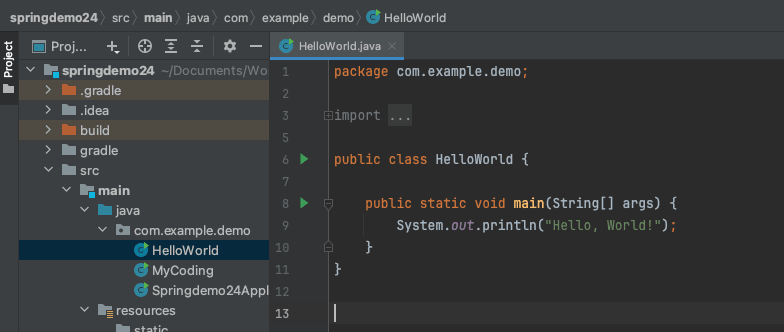
Below is a simple Java program that prints "Hello, World!" to the console:
  public class HelloWorld {
    public static void main(String[] args) {
      System.out.println("Hello, World!");
    }
  }
Common Uses of Java:
- Enterprise Applications: Building large-scale systems for businesses.
- Android App Development: Creating apps for the world's most popular mobile platform.
- Web Applications: Developing web-based applications and services.
- Embedded Systems: Processing and analyzing large datasets.
Difference between JDK, JRE, and JVM?
The terms JDK, JRE, and JVM are all related to Java programming, but they refer to different components of the Java ecosystem. Here’s an explanation of each:
1. JDK (Java Development Kit):
- Purpose: The JDK is a software development kit used to develop Java applications.
- Contains: It includes everything that the JRE contains, plus development tools such as a compiler (javac), a debugger, and tools for creating Java documentation.
- Use Case: If you want to develop Java applications, you need the JDK because it provides tools to write, compile, and debug Java code.
- Components: JRE (Java Runtime Environment), Java compiler (javac), Debugger, Libraries and tools for development
- Who uses it?: Java developers.
2. JRE (Java Runtime Environment):
- Purpose: The JRE provides the runtime environment required to execute Java applications.
- Contains: It includes the Java Virtual Machine (JVM), core libraries, and other components necessary to run Java applications, but not the compiler or development tools.
- Use Case: If you only need to run Java applications (not develop them), the JRE is sufficient.
- Components: JVM (Java Virtual Machine), Core libraries, Other runtime components (such as garbage collection, memory management)
- Who uses it?: End users who need to run Java applications but not develop them.
3. JVM (Java Virtual Machine):
- Purpose: The JVM is a part of both the JDK and JRE and is responsible for executing Java bytecode. It is a virtual machine that abstracts the underlying hardware, allowing Java programs to be platform-independent.
- Contains: It interprets or compiles Java bytecode into machine code for execution on the host machine.
- Use Case: The JVM enables Java's "write once, run anywhere" capability, as it abstracts the platform on which the code runs.
- Components: Class loader, Bytecode verifier, Execution engine (interpreter, Just-In-Time compiler)
- Who uses it?: JVM is used by both the JRE (for running Java programs) and JDK (during development and testing).
How to Install Java?
- Visit the official Java website (oracle.com/java/technologies/downloads/)
- Choose the appropriate version for your operating system (Windows, macOS, Linux)
- Download the installer
- Run the installer and follow the on-screen instructions
- Run the installer and follow the on-screen instructions
Verify the installation by opening a command prompt/terminal and typing.
java -version
Below is a simple Java program that prints "Hello, World!" to the console:
  public class HelloWorld {
    public static void main(String[] args) {
      System.out.println("Hello, World!");
    }
  }
Run java code, type below command on terminal :
javac HelloWorld.java
Below Code Explanation
 public class HelloWorld {
    public static void main(String[] args) {
      System.out.println("Hello, World!");
    }
  }
public class HelloWorld {
This line declares a public class named HelloWorld. In Java, the class name should match the file name (HelloWorld.java).
public static void main(String[] args)
- public: The method is accessible from outside the class.
- static: The method belongs to the class, not to any specific instance.
- void: The method doesn't return any value.
- main: The name of the method.
- String[] args: An array of String arguments that can be passed to the program.
System.out.println("Hello, World!");
- System.out: Refers to the standard output stream.
- println(): A method that prints the argument passed to it and then moves to a new line.
Output of the code:
"Hello, World!"
Java Comments
 //This is single line comment
 /* This is for multiline code comments */
System.out.println("Hello, World!");
Java Data Types & Variables
1. Types:
- Primitive: byte, short, int, long, float, double, boolean, char
- Reference: Objects, arrays, String
2. Declaration: dataType variableName; Example: int age;
3. Initialization: dataType variableName = value; Example: int age = 25;
4. Naming conventions:
- Start with a letter, $, or _
- CamelCase for variables (e.g., myVariable)
- Constants in ALL_CAPS
5. Scope:
- Local: Inside methods
- Instance: Class-level, unique to each object
- Static: Class-level, shared among all objects
6. Final variables: Cannot be changed after initialization
7. Type inference (Java 10+): var variableName = value;
Differences between final, static, and final static in Java
1. final:
- Applies to variables, methods, and classes
- For variables: The value cannot be changed after initialization
- For methods: Cannot be overridden in subclasses
- For classes: Cannot be extended
2. static:
- Applies to variables, methods, and nested classes
- Belongs to the class rather than instances of the class
- Can be accessed without creating an object of the class
- Shared among all instances of the class
3. final static:
- Combines the properties of both final and static
- Creates a constant that belongs to the class, not instances
- Cannot be changed and is shared among all instances
- Often used for global constants
public class Example {
 final int finalVar = 10;  // Instance constant
 static int staticVar = 20;  // Class variable
 final static int FINAL_STATIC_VAR = 30;  // Class constant
 }
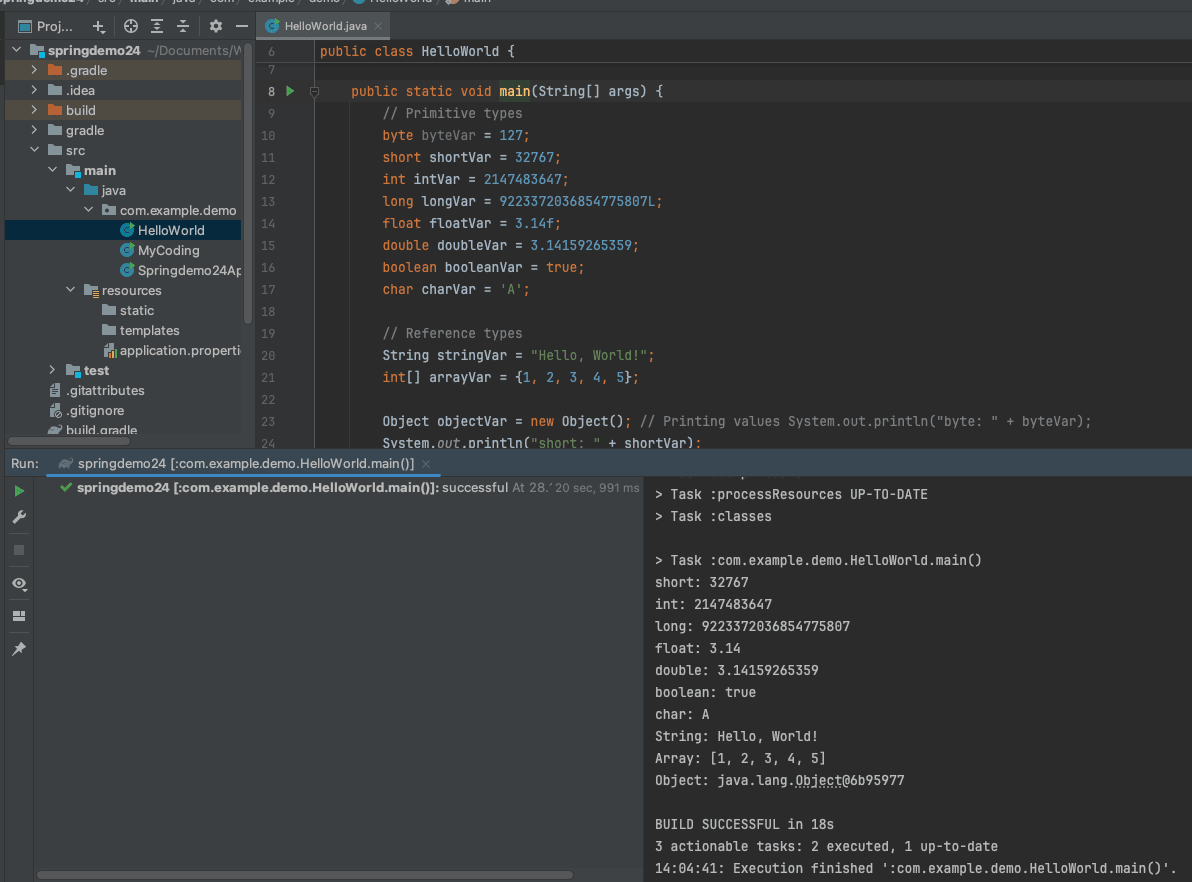
Java Data types and variables example:
public classDataTypesExample {
public static void main(String[] args) {
// Primitive types
byte byteVar = 127;
short shortVar = 32767;
int intVar = 2147483647;
long longVar = 9223372036854775807L;
float floatVar = 3.14f;
double doubleVar = 3.14159265359;
boolean booleanVar = true;
char charVar = 'A';

 // Reference types
String stringVar = "Hello, World!";
int[] arrayVar = {1, 2, 3, 4, 5};

Object objectVar = new Object(); // Printing values System.out.println("byte: " + byteVar);
System.out.println("short: " + shortVar);
System.out.println("int: " + intVar);
System.out.println("long: " + longVar);
System.out.println("float: " + floatVar);
System.out.println("double: " + doubleVar);
System.out.println("boolean: " + booleanVar);
System.out.println("char: " + charVar);
System.out.println("String: " + stringVar);
System.out.println("Array: " + java.util.Arrays.toString(arrayVar));
System.out.println("Object: " + objectVar);
}
}


Comments (0)
No comments yet. Be the first to comment!