
Java Topic
Java Math
The java.lang.Math class provides a set of static methods and constants for performing mathematical operations. It includes methods for basic arithmetic, trigonometric functions, logarithms, and more.
1. Basic Arithmetic
The Math class provides methods for basic arithmetic operations:
- Addition:
Adds two integers with overflow checking.double sum = Math.addExact(a, b);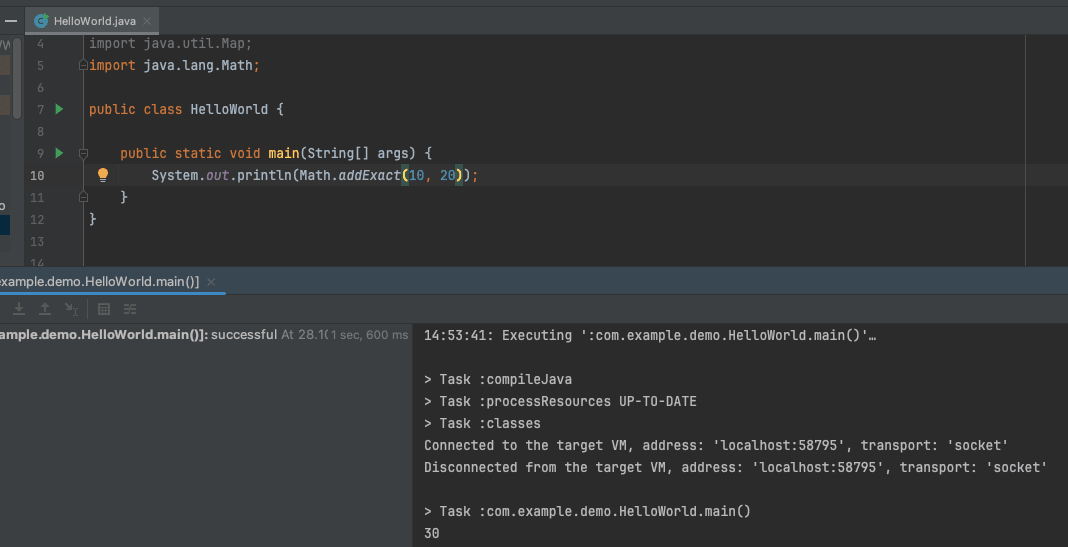
- Subtraction:
Subtracts one integer from another with overflow checking.double difference = Math.subtractExact(a, b); - Multiplication:
Multiplies two integers with overflow checking.double product = Math.multiplyExact(a, b); - Division:
Returns the largest (closest to positive infinity) integer that is less than or equal to the algebraic quotient.double quotient = Math.floorDiv(a, b);
2. Trigonometric Functions
The Math class provides methods for trigonometric calculations:
- Sine:
Returns the sine of the specified angle (in radians).double sine = Math.sin(angle); - Cosine:
Returns the cosine of the specified angle (in radians).double cosine = Math.cos(angle); - Tangent:
Returns the tangent of the specified angle (in radians).double tangent = Math.tan(angle); - Arc Sine:
Returns the arc sine of the specified value, in radians.double arcSine = Math.asin(value); - Arc Cosine:
Returns the arc cosine of the specified value, in radians.double arcCosine = Math.acos(value); - Arc Tangent:
Returns the arc tangent of the specified value, in radians.double arcTangent = Math.atan(value);
3. Exponential and Logarithmic Functions
The Math class includes methods for exponential and logarithmic calculations:
- Exponentiation:
Returns Euler's number raised to the specified power.double exp = Math.exp(value); - Natural Logarithm:
Returns the natural logarithm (base e) of the specified value.double ln = Math.log(value); - Base-10 Logarithm:
Returns the base-10 logarithm of the specified value.double log10 = Math.log10(value); - Square Root:
Returns the square root of the specified value.double sqrt = Math.sqrt(value);
4. Rounding Functions
The Math class provides methods for rounding numbers:
- Round:
Rounds the specified value to the nearest long.long rounded = Math.round(value); - Ceiling:
Returns the smallest double value that is greater than or equal to the specified value.double ceil = Math.ceil(value); - Floor:
Returns the largest double value that is less than or equal to the specified value.double floor = Math.floor(value);
5. Constants
The Math class defines several constants:
-
: The value of pi (π), approximately 3.14159.Math.PI -
: The base of natural logarithms (e), approximately 2.71828.Math.E
6. Random Numbers
The Math class provides a method for generating random numbers:
- Random:
Returns a random double value between 0.0 (inclusive) and 1.0 (exclusive).double random = Math.random();
Java Booleans
The boolean data type in Java represents a value that can be either true or false. It is a fundamental type used for logical operations, conditional statements, and controlling the flow of execution.
1. Declaring and Initializing Booleans
In Java, you can declare and initialize boolean variables as follows:
- Declaration:
boolean flag; - Initialization:
flag = true;flag = false; - Declaration with Initialization:
boolean isActive = true;
2. Boolean Operations
Java provides several operators to perform logical operations with boolean values:
- Logical AND:
Returns true if bothboolean result = (a && b);aandbare true. - Logical OR:
Returns true if at least one ofboolean result = (a || b);aorbis true. - Logical NOT:
Returns true ifboolean result = !a;ais false, and vice versa. - XOR (Exclusive OR):
Returns true ifboolean result = (a ^ b);aandbare different.
3. Conditional Statements
Booleans are commonly used in conditional statements to control the flow of execution:
- If Statement:
if (condition) {// code to execute if condition is true} - If-Else Statement:
if (condition) {// code to execute if condition is true} else {// code to execute if condition is false} - Switch Statement:
switch (value) {case true:// code for truebreak;case false:// code for falsebreak;}
4. Comparison Operators
Booleans are also used with comparison operators to evaluate expressions:
- Equal to:
Returns true ifboolean result = (a == b);ais equal tob. - Not Equal to:
Returns true ifboolean result = (a != b);ais not equal tob. - Greater Than:
Returns true ifboolean result = (a > b);ais greater thanb. - Less Than:
Returns true ifboolean result = (a < b);ais less thanb. - Greater Than or Equal To:
Returns true ifboolean result = (a >= b);ais greater than or equal tob. - Less Than or Equal To:
Returns true ifboolean result = (a <= b);ais less than or equal tob.
5. Boolean Methods
The Boolean class, a wrapper class for the boolean primitive type, provides utility methods:
- parseBoolean:
Converts a string to a boolean value.boolean flag = Boolean.parseBoolean("true"); - valueOf:
Returns a Boolean instance representing the specified boolean value.Boolean bool = Boolean.valueOf(true); - toString:
Returns a string representation of the boolean value.String str = Boolean.toString(true);
6. Default Value
The default value of a boolean variable when declared but not initialized is false.


Comments (0)
No comments yet. Be the first to comment!