
Java Topic
Java Loops
Loops in Java are used to execute a block of code repeatedly based on a condition. Java provides several types of loops, each with specific use cases. The primary loop types are for, while, and do-while.
1. For Loop
The for loop is used when the number of iterations is known beforehand. It consists of three parts: initialization, condition, and update:
for (initialization; condition; update) {
    // code to execute on each iteration
}
Example:
for (int i = 0; i < 5; i++) {
    System.out.println(i);
}
This loop will print numbers from 0 to 4. The loop initializes i to 0, runs as long as i < 5, and increments i by 1 after each iteration.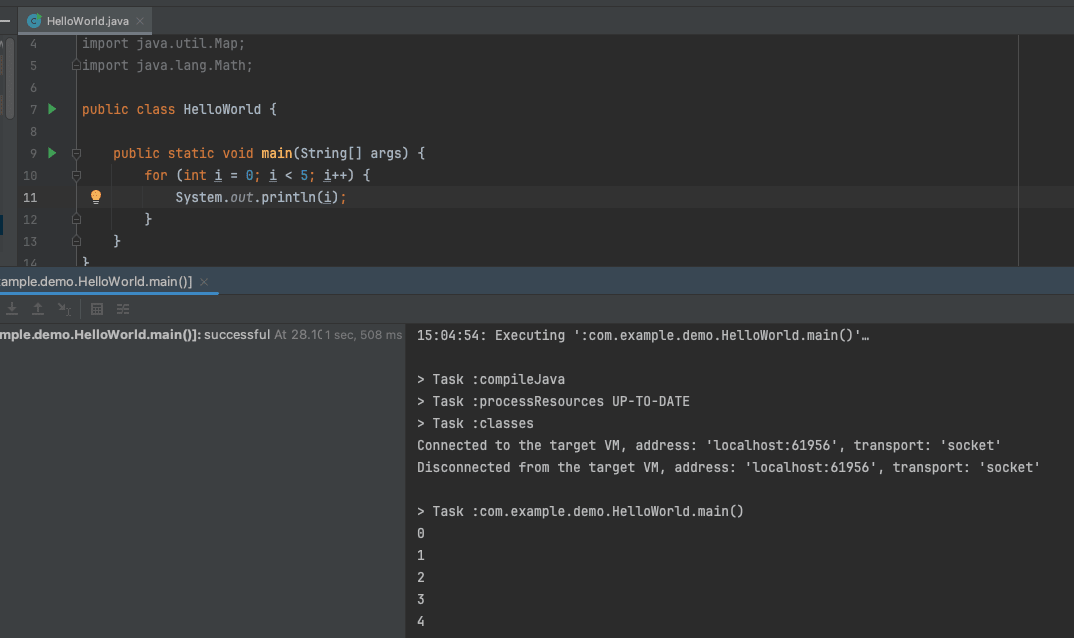
2. While Loop
The while loop is used when the number of iterations is not known and depends on a condition. It continues to execute as long as the condition remains true:
while (condition) {
    // code to execute on each iteration
}
Example:
int i = 0;
while (i < 5) {
    System.out.println(i);
    i++;
}
This loop will also print numbers from 0 to 4. The condition i < 5 is checked before each iteration, and i is incremented inside the loop.
3. Do-While Loop
The do-while loop is similar to the while loop, but it guarantees that the code block will execute at least once, as the condition is evaluated after the loop body:
do {
    // code to execute on each iteration
} while (condition);
Example:
int i = 0;
do {
    System.out.println(i);
    i++;
} while (i < 5);
This loop will print numbers from 0 to 4. The code block executes first, then the condition i < 5 is checked.
4. Enhanced For Loop
The enhanced for loop (also known as the "for-each" loop) is used to iterate over arrays or collections. It simplifies iteration without using an index:
for (type item : array) {
    // code to execute for each item
}
Example:
int[] numbers = {1, 2, 3, 4, 5};
for (int number : numbers) {
    System.out.println(number);
}
This loop iterates over the numbers array and prints each element.
5. Break and Continue Statements
The break statement is used to exit a loop prematurely, while the continue statement skips the current iteration and proceeds to the next iteration:
- Break Statement:
for (int i = 0; i < 10; i++) {
    if (i == 5) {
        break;
    }
    System.out.println(i);
}
This loop will print numbers from 0 to 4, then exit the loop when
iequals 5. - Continue Statement:
for (int i = 0; i < 10; i++) {
    if (i % 2 == 0) {
        continue;
    }
    System.out.println(i);
}
This loop will print only odd numbers between 0 and 9, skipping even numbers.
6. Labeled Loops
Labeled loops can be used to break or continue from nested loops. A label is specified before the loop, and can be used with the break or continue statements to specify which loop to affect:
outerLoop: for (int i = 0; i < 5; i++) {
    for (int j = 0; j < 5; j++) {
        if (j == 2) {
            break outerLoop;
        }
        System.out.println("i = " + i + ", j = " + j);
    }
}
This example will exit the outer loop when j equals 2, printing values of i and j before the exit.


Comments (0)
No comments yet. Be the first to comment!